
Key Words / Phrases
- Status of refund
- Amount of refund
- Where is refund
- When will I receive refund
- I’d like a refund
Refunds <F11>
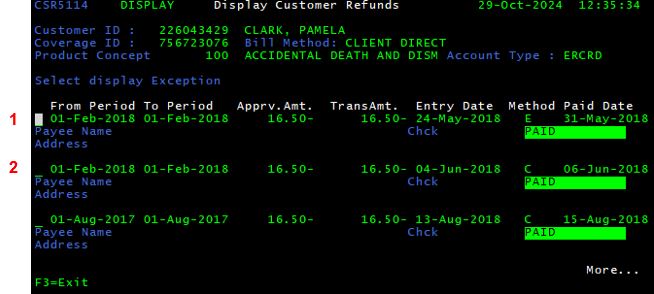
From the Display Customer Billings screen, press <F11> to view information regarding refunds. The Display Customer Refunds screen is shown. From here, the user can determine the refund method, customer who was refunded and refund amount.
| Refund Field | Function |
| Period to Period | Displays the date range of the coverage period refunded |
| Amount | Displays the premium amount refunded |
| Entry Date | Displays the date on which the refund was requested |
| Method | Displays the refund method… |
| C: Check (Paper or Manual) | |
| E: Electronic | |
| Paid Date | Displays the date on which the refund was paid |
| Status | Displays the status of collection… |
| REQUESTED: Pending approval from Customer Relations | |
| APPROVED: Pending approval from Accounting | |
| WAITING: Refund will be paid on the next refund date | |
| DENIED: Refund denied; will not be granted | |
| PAID: Refund processed/mailed |
Frequently Asked Questions
When will I receive my refund?
“Within 3 weeks after the (Paid Date).”
What is the amount of my refund?
“Your refund is for (TransAmt.).”
I would like to get a refund.
Go to the F13 screen and select the REFREQ letter.
Example of Failed Attempt of an Electronic Refund
1st Refund Attempt
- For $16.50
- For the period starting in February 2018 (Includes February, March, & April since AD&D is billed quarterly)
- Which was requested on May 31
- Via electronic deposit (Method E)
2nd Refund Attempt
- For the same amount ($16.50)
- For the same period (February 2018)
- Within a short period of time (paid date is June 6 which is close to May 31)
- Via check (Method C)
At NO TIME should a refund be requested for another time period if the electronic refund failed. If a refund is issued for the first period, the policy will be cancelled.
fmservice.com
Customers cannot request a refund on fmservice.com.