Key Words / Phrases
- Change beneficiary
- Update beneficiary
- Add beneficiary
- Who’s my beneficiary
- Don’t know who my beneficiary is
Frequently Asked Questions
I would like to change my beneficiary.
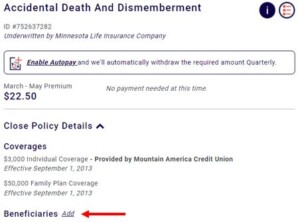
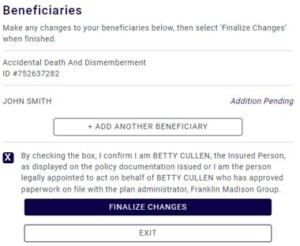
“I can email you a form or you can go to fmservice.com and create a log-in to access your policy information. On fmservice.com, you can add, edit, and remove beneficiaries. You can also see your policy information, make a payment, and do other things as well.”
If sending a form, go to the F13 screen and select the BENE_CHG form. (You will need to select BENFRMMN for Minnesota Life customers). Other customers may require the BENEFORM or BNCHGMN forms.
Who is my beneficiary? I would like to confirm my beneficiary.
– FOR MINNESOTA LIFE ONLY: “The beneficiaries listed are…”
[If the system shows beneficiary names with a “+”] “The beneficiaries I see are (read names of beneficiaries). However, I do see that there are (number) additional beneficiaries listed in which I cannot see their names. Let me go ahead and send you a letter which lists all of your beneficiaries.”
– FOR OTHER CARRIERS: “For privacy reasons, you can tell me who you believe is the beneficiary and I would be glad to confirm that information for you.”
[If unable to confirm], “I can mail a letter to you which lists your beneficiaries.”
– If mailing a beneficiary confirmation letter, go to the F15 screen and place a B next to the latest beneficiary change request (CHBENE).

[Primary insured is deceased] Who was the beneficiary? I would like to confirm the beneficiary.
“Please submit your request in writing to:
Franklin Madison Group
Plan Administrator
P.O. Box 689070
Franklin, TN 37068-9070”
fmservice.com
Customers can add, edit, and remove beneficiaries on fmservice.com. Please make sure the customer is clicking “finalize changes” to confirm their changes.
The customer will receive an email confirmation that their beneficiary has been updated.