
Received a PDN, but cannot make a payment online
- Customers cannot make a payment online if the due date on the PDN has passed.
Remember, customers cannot make payments in arrears
Coverage has unpaid status, but cannot make a payment online
- This means we will rebill the account to collect premium. If we do not successfully collect premium after making multiple attempts, then the customer will be able to make a payment online.
When making a payment
Make sure the customer is:
- Entering the accepted method of payment
- We only accept credit cards (AMEX, Discover, VISA, MasterCard) and debit cards. We do not accept checking or savings account information.
- Entering the correct CVV code
- The CVV is 3-digits for Discover, VISA, and MasterCard and is located on the back of the card
- The CVV is 4-digits for AMEX and is located on the front of the card
- Using the correct expiration date format of 2-digit month and 2-digit year
- For example, 09/23 or 10/26
- Selecting the billing address before clicking “next”
- Clicking on “submit” one time
The customer will see an error message if not entering their payment information correctly.
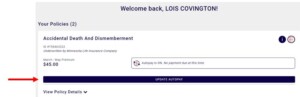
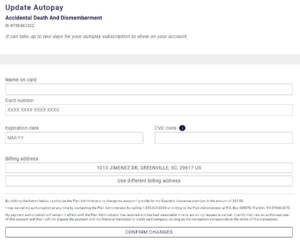
Paid, Update Autopay
Unpaid, Hard Decline


Unpaid, Direct Bill


